

API access isn't enabled on your PlanSource account. Contact your PlanSource representative and ask them to enable it.
PlanSource – How do I connect my account?
Updated today
This guide walks you through connecting your PlanSource account to Bindbee.
Before you begin
A PlanSource administrator account with access to System Administration > System.
API access enabled on your PlanSource account. If you don't see the API Users option, contact your PlanSource representative to enable it.
Your Bindbee Magic Link.
Create an API user in PlanSource
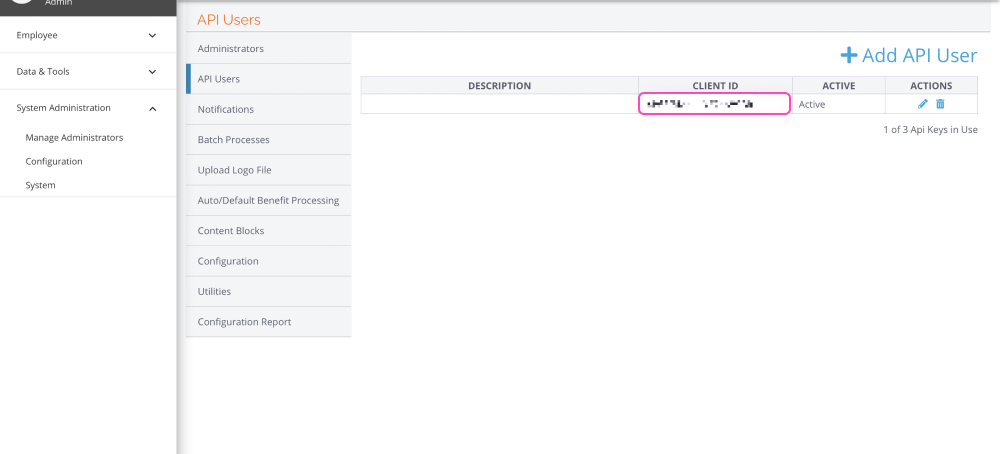
Log in to PlanSource and go to System Administration > System > API Users.
Click Add API User.
Add a description that identifies the user, such as Bindbee Integration.
Select Active.
Under Authentication Types, select OAuth2, and all applicable subsections.
Copy the generated Client ID and Client Secret, and store them somewhere secure.
Click Save.
Copy the Client Secret before you click Save. PlanSource may not show it again, and if you lose it, you'll need to create a new API user.
Enter your details in Bindbee
Open your Bindbee Magic Link and enter these four values when prompted.
Field | What to enter |
|---|---|
Client ID | The Client ID generated for the API user. |
Client Secret | The Client Secret generated with the Client ID. |
Admin Username | The username of a PlanSource administrator with permission to access the data you're sharing. |
Environment | Production or Development. Choose the environment where you created the API user. |
If possible, use a dedicated administrator account rather than a personal login, so the connection keeps working when someone leaves. See Should I use a service account or my own login?
Troubleshooting
I can't see the API Users option
I lost the Client Secret
Create a new API user using the steps above, then enter its Client ID and Client Secret in Bindbee.
Bindbee doesn't accept my credentials
Check that the environment you selected matches the one where you created the API user. Development credentials don't work in Production, and Production credentials don't work in Development. Also confirm that the API user is set to Active with OAuth2 selected.
Was this helpful?
Was this helpful?